





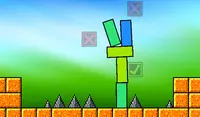






Tower Builder icon

Tower Builder

Genre:
Updated:
Feb 25, 2026
Release:
Feb 24, 2026
Platforms:
Browser, Mobile

Instructions

Build a mighty tower! The icon in the upper left corner of the screen shows how many blocks need to be placed and what shapes they will be. Tap and hold to see a preview of the shape. Drag to where you want to place the block. Once you're ready to drop it into place, release.

Repeat this pattern until you have finished placing all blocks. The tower will have to stand steady for three seconds. If even one block falls, then you'll need to start over!

Some levels will already have blocks placed on the platform, so you'll need to build around them with the remaining blocks! Later levels will have more than one platform for you to stack blocks on top of.
Build a mighty tower! The icon in the upper left corner of the screen shows how many blocks need to be placed and what shapes they will be. Left Click and hold to see a preview of the shape. Drag your mouse to where you want to place the block. Once you're ready to drop it into place, release.

Repeat this pattern until you have finished placing all blocks. The tower will have to stand steady for three seconds. If even one block falls, then you'll need to start over!

Some levels will already have blocks placed on the platform, so you'll need to build around them with the remaining blocks! Later levels will have more than one platform for you to stack blocks on top of.

Game Progress

0 XP
Genre:
Updated:
Feb 25, 2026
Release:
Feb 24, 2026
Platforms:
Browser, Mobile

Instructions

Build a mighty tower! The icon in the upper left corner of the screen shows how many blocks need to be placed and what shapes they will be. Tap and hold to see a preview of the shape. Drag to where you want to place the block. Once you're ready to drop it into place, release.

Repeat this pattern until you have finished placing all blocks. The tower will have to stand steady for three seconds. If even one block falls, then you'll need to start over!

Some levels will already have blocks placed on the platform, so you'll need to build around them with the remaining blocks! Later levels will have more than one platform for you to stack blocks on top of.

Build a mighty tower! The icon in the upper left corner of the screen shows how many blocks need to be placed and what shapes they will be. Left Click and hold to see a preview of the shape. Drag your mouse to where you want to place the block. Once you're ready to drop it into place, release.

Repeat this pattern until you have finished placing all blocks. The tower will have to stand steady for three seconds. If even one block falls, then you'll need to start over!

Some levels will already have blocks placed on the platform, so you'll need to build around them with the remaining blocks! Later levels will have more than one platform for you to stack blocks on top of.